
How to Change Battle Speed
Change It in the Options Menu
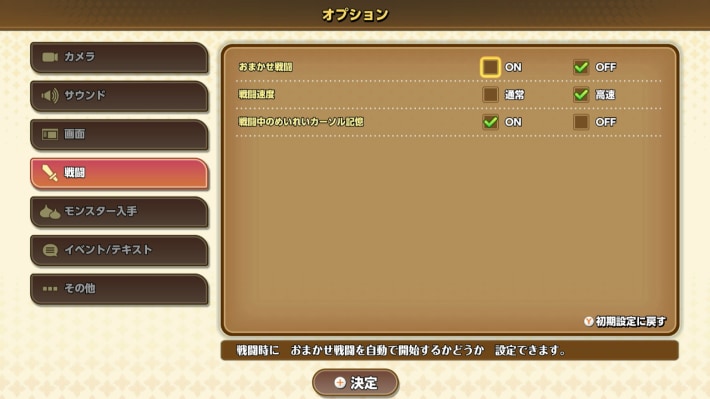
| How to Change It | Menu → System → Options |
|---|
In Dragon Quest Monsters: The Withered World (DQM4), you can set battle speed to either “Normal” or “Fast” in the Options menu. You can’t change the setting until you progress through the story and obtain the Waterwing Can, so if you want to change it early on, progress through the story first.
Recommended Settings and How to Change Them
Change It with ZL During Battle
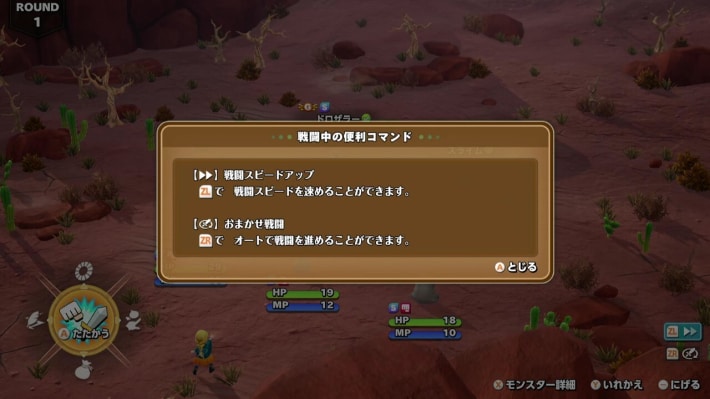
You can also change battle speed by pressing ZL during battle. If you want to change it frequently, adjust the speed during battle.
What to Do If You Can’t Change Battle Speed
Progress Through the Story to Get the Waterwing Can

To change battle speed in DQM: The Withered World, you need to progress through the story and obtain the Waterwing Can. Until you have it, you can’t change battle speed in the Options or during battle.